

This started with a simple thought: we already trust community intelligence during investigation, so why are we not using it before the traffic reaches us?
No paid threat-intel subscription. No heavy SIEM licensing story. No fancy black-box appliance.
Just community feeds, a small publishing layer in Pramaan, an Argusoft SaaS application, and proactive blocking at the firewall.
The result was not small. On traffic paths where Sophos ATP (Active Threat Response) actually evaluates third-party threat feeds, the volume of threat items requiring triage dropped noticeably during the observation window. This was an operational before/after comparison on the same covered traffic path, not a formal benchmark, and it does not include the DNAT-forwarded path, which SFOS 21.5 does not evaluate for source-IP threat-feed matches in the same way as supported outgoing and firewall-destined traffic.
Introduction#
Most security work starts after something has already made noise.
A suspicious source IP keeps touching SSH. A random URL shows up in proxy logs. A domain appears in malware telemetry. An analyst copies the IOC, checks reputation, adds it somewhere, and moves to the next thing.
That flow works, but it is reactive.
The question I had was simple:
If thousands of known-bad indicators are already published by the community every day, why should my firewall wait for them to knock first?
That question became the Threat Intel feed workflow inside Pramaan.
The goal was not to build another threat intelligence platform for the sake of having one more dashboard. The goal was much smaller and more useful:
- collect community indicators,
- normalize them,
- split them by indicator type,
- publish organization-specific feed URLs,
- let the firewall poll them,
- and keep enough logs to prove what happened.
It sounds like a text-file problem.
It was not.
Context: Where The Implementation Fits#
This post is not about Pramaan as a product. That may be a separate post later.
This threat feed work came from a practical challenge: community intelligence was available, firewalls could consume third-party feeds, and internet-facing systems received plenty of noisy traffic. But there was no clean middle layer that could normalize those indicators, publish them safely, keep organization boundaries, and still remain simple enough for a firewall to poll.
So I built a custom implementation inside Pramaan for this specific workflow.
The implementation was then validated with a Sophos XGS 2300 against real internet traffic rather than only lab-generated requests. Environment ownership, location, addresses, and other identifying details are intentionally omitted or generalized. This was an anonymized technical validation, not a description of a named employer’s firewall estate or a customer security engagement.
That mattered.
Because a feed pipeline that works in a clean demo can still fail in the boring parts of production: firewall auth support, DNAT paths, stale indicators, feed expiry, polling behavior, and whether a “blocked” source is actually blocked on the path you care about.
The Problem With “Just Block These IPs”#
At first, threat feeds look very simple.
One source gives IPs.
Another gives domains.
Another gives URLs.
Some upstream sources include CIDR ranges. Pramaan canonicalizes and retains the original network, but it deliberately expands only IPv4 ranges from /24 through /32 into individual addresses. Broader IPv4 ranges and IPv6 CIDRs remain CIDR entries instead of being expanded into an impractically large number of addresses.
Some include comments.
Some include old entries.
Some disappear for a while and come back later.
And then there is the real production question:
Should every organization receive every indicator?
The answer is no.
One bad entry in a block list can become a business outage. One stale indicator can waste analyst time. One missing allowlist can break access to something legitimate. This is why I did not want Pramaan to simply download feeds and throw them at the firewall.
The Community Feed Expiry Problem#
This was the bigger reason a custom layer was needed.
Community feeds are living lists. That is their strength. It is also the part that makes naive blocking risky. In one sync cycle, Emerging Threats removed an IP from the feed. From the upstream feed’s point of view, that made sense: the list had moved on. But the next day, that same IP was still appearing in local telemetry.
That created a small but important question:
If a community feed stops listing an IP today, should the firewall immediately stop treating it as dangerous?
For now, my answer is no.
Pramaan does not remove an indicator the moment one upstream source drops it. If an IP is seen once, it stays in block mode for 30 days, and the clock refreshes whenever the same IP reappears in a future upstream sync. After the block window expires, it moves into monitor mode for another 30 days.
flowchart TD
    A[Seen in source feed] --> B[Block mode for 30 days]
    B --> C{Seen again in an upstream sync?}
    C -- Yes --> D[Refresh the 30-day block window]
    D --> B
    C -- No --> E[Move to monitor mode for 30 more days]
    E --> F{Local hit while monitored?}
    F -- Yes --> G[Promote back to block mode]
    G --> B
    F -- No --> H[Expire if it stays quiet]
The 30-day window is a pragmatic baseline, not a proven optimum. As we gather more data on attacker infrastructure re-use, the policy will need tuning.
The point is the shape of the decision: community feeds should influence the block list, but they should not be the firewall’s only memory. If something was bad enough to enter the feed and it is still appearing in local telemetry, it should not disappear from enforcement just because an upstream text file rotated.
This is where the monitor URL becomes useful. Once an IP ages out of the block feed, it stays visible through the monitor feed. If an IP in monitor mode hits us again, Pramaan should promote it back into block mode and reset the 30-day window. That promotion loop is still WIP.
The platform needed a little more discipline:
- global feed sync should happen once on the schedule defined by each feed provider,
- organizations should choose what they want,
- allowlists should always win,
- block and monitor feeds should be separate,
- feed access should be logged,
- and the firewall should consume plain URLs without caring how messy the backend is.
What Was Built#
The first version was intentionally boring.
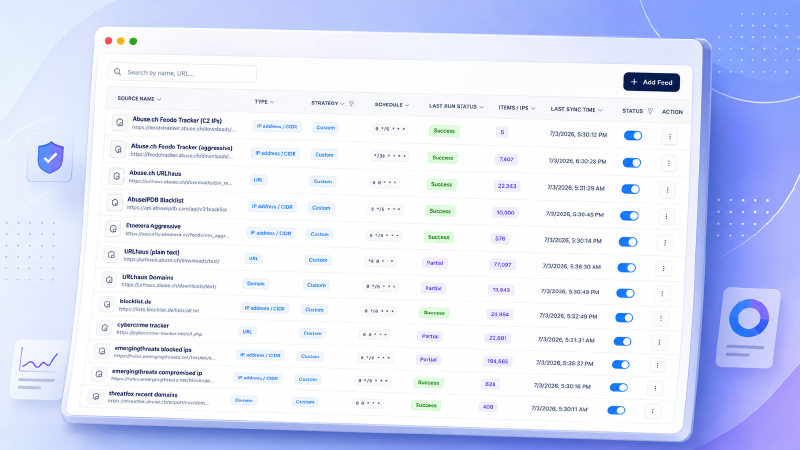
Pramaan maintains a list of source feeds. Each feed has a type, sync schedule, last run status, item count, and enabled state. Some upstream feeds contain individual IP addresses, while others also contain CIDR networks. During ingestion, Pramaan canonicalizes the network address and stores the original CIDR. For IPv4 prefixes from /24 through /32, it also creates the individual IP indicators that can be included in the Sophos-compatible ip.txt feed. IPv4 networks broader than /24 are kept only as CIDRs to avoid a large expansion, and IPv6 CIDRs are also preserved without expansion. Those retained network indicators are published separately for consumers or firewall workflows that support CIDR values. Some feeds contain domains, and others contain URLs.
In the current setup, the source catalog had 12 active threat feeds and 462,636 normalized indicators across IP/CIDR, domain, and URL types. These are ingestion-side classifications. The Sophos ip.txt output contains individual IPv4 indicators, including addresses produced from eligible /24 to /32 ranges; retained CIDRs are kept out of that feed:
| Metric | Count |
|---|---|
| Total feeds | 12 |
| Active feeds | 12 |
| Inactive feeds | 0 |
| Total IP indicators | 333,257 |
| Domain indicators | 19,075 |
| URL indicators | 110,304 |
| Total indicators | 462,636 |
The configured feeds were:
| Feed | Upstream indicator type |
|---|---|
| Abuse.ch Feodo Tracker (C2 IPs) | IP address / CIDR |
| Abuse.ch Feodo Tracker (aggressive) | IP address / CIDR |
| Abuse.ch URLhaus | URL |
| AbuseIPDB Blacklist | IP address / CIDR |
| Etnetera Aggressive | IP address / CIDR |
| URLhaus (plain text) | URL |
| URLhaus Domains | Domain |
| blocklist.de | IP address / CIDR |
| cybercrime tracker | URL |
| Emerging Threats blocked IPs | IP address / CIDR |
| Emerging Threats compromised IP | IP address / CIDR |
| ThreatFox recent domains | Domain |
Counts change with every upstream sync, so treat these as a snapshot from the sync window rather than a fixed inventory.
The firewall did not need to know any of this internal structure.
It only needed URLs.
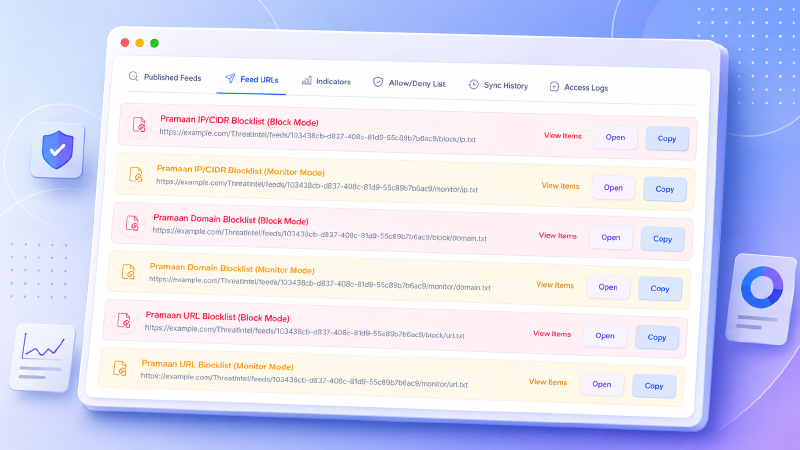
https://example.com/ThreatIntel/feeds/{organizationId}/block/ip.txt
https://example.com/ThreatIntel/feeds/{organizationId}/monitor/ip.txt
https://example.com/ThreatIntel/feeds/{organizationId}/block/cidr.txt
https://example.com/ThreatIntel/feeds/{organizationId}/monitor/cidr.txt
https://example.com/ThreatIntel/feeds/{organizationId}/block/domain.txt
https://example.com/ThreatIntel/feeds/{organizationId}/monitor/domain.txt
https://example.com/ThreatIntel/feeds/{organizationId}/block/url.txt
https://example.com/ThreatIntel/feeds/{organizationId}/monitor/url.txt
The hostname and path above are representative. The real Pramaan endpoints use a different host and organization-scoped path, but the structure is the same: one simple text file per indicator type and mode. The CIDR output is separate because not every feed consumer accepts network ranges; the Sophos configuration in this pilot used the individual-address ip.txt feed. That small URL shape mattered.
Sophos XGS can consume third-party threat feeds through external URLs. So instead of forcing the firewall into Pramaan’s world, Pramaan published feeds in the shape the firewall already understood.
Firewall Consumption#
In Sophos, the feed configuration becomes very straightforward. In SFOS 21.5, this is configured under Active threat response → Third-party threat feeds. For each feed, the administrator selects the action, indicator type, external URL, authentication method, and polling interval. The mental model is simple: Sophos polls an external feed URL, classifies it by indicator type, and applies the selected action.
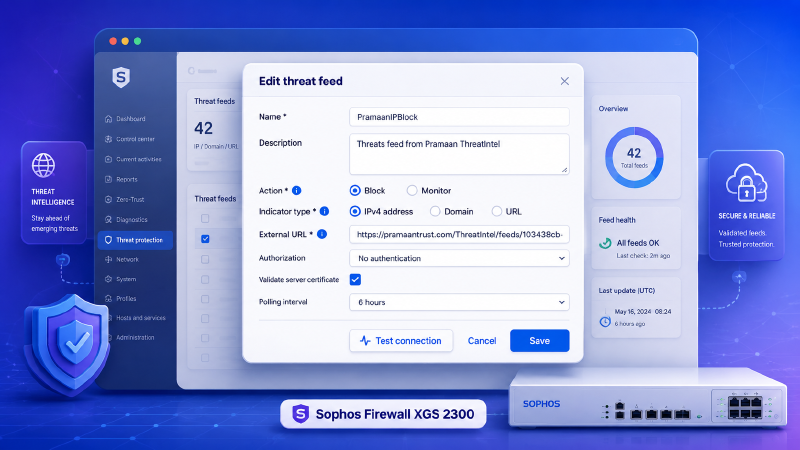
The important part is that the firewall action still remains explicit. Pramaan publishes the feed. Sophos decides how to enforce it.
That separation kept the MVP clean.
The First Useful Signal#
After configuring the feed on the firewall, the useful signal showed up in the Sophos Active Threat Response logs: source IPs from the Pramaan-backed block feed were being matched and dropped.
The tables and dashboards later in this post say “ATP,” not “ATR.” That is not a typo. ATP is the log type Sophos carried over from when this feature was called Advanced Threat Protection, before it was renamed Active Threat Response.
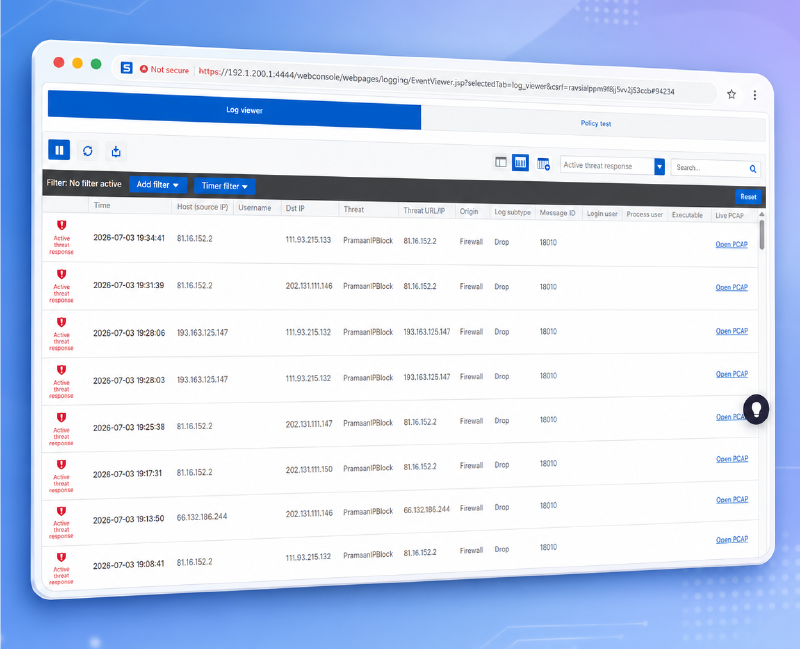
That proved the feed was not just configured. It was being enforced by the firewall.
I also checked one of the dropped source IPs, 81.16.152.2, in VirusTotal. The result gave a second point of validation: 9 out of 91 security vendors flagged the IP as malicious, with detections such as malicious, malware, phishing, and suspicious.
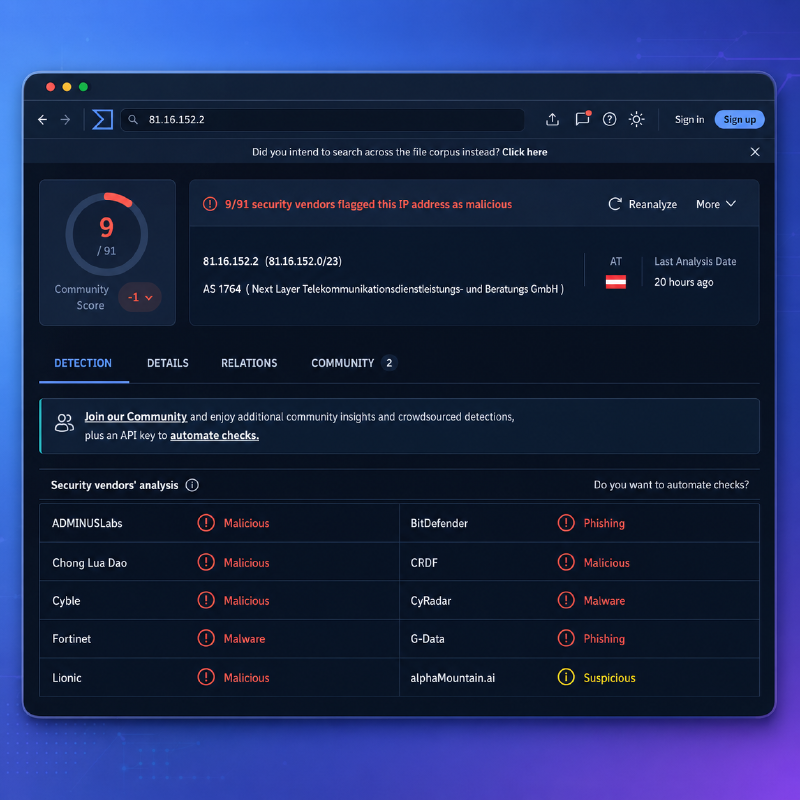
No dramatic alert. No incident bridge. Just known-bad sources being handled by the firewall before they became analyst work.
The Dashboard Told the Better Story#
The numbers made the effect visible.
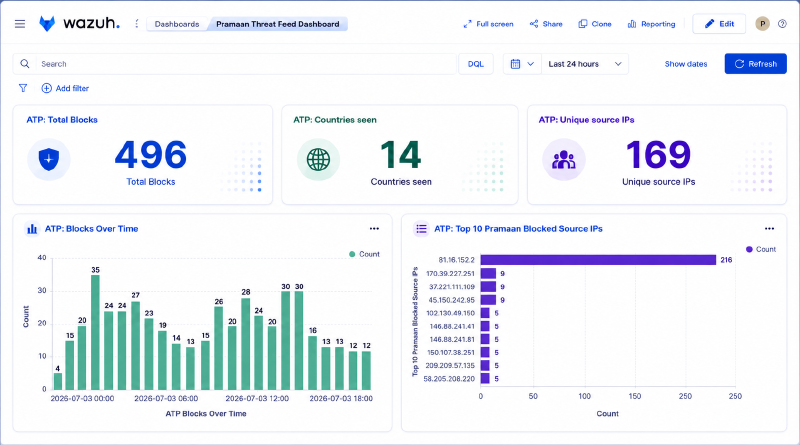
Sophos showed the individual drops, but the better operational picture came after those logs were collected in Wazuh. Over a 24-hour window, the SIEM view showed:
| Metric | Value |
|---|---|
| Total ATP blocks | 496 |
| Countries seen | 14 |
| Unique source IPs | 169 |
The dashboard made the pattern easier to understand than raw firewall logs. It showed blocks over time, the spread across countries, and the top Pramaan-blocked source IPs. One source, 81.16.152.2, dominated the list with 216 blocks in the 24-hour window.
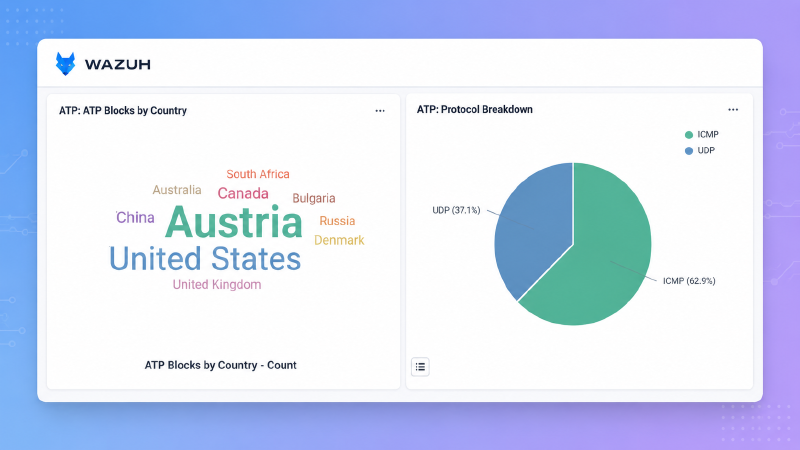
A second Wazuh view broke the same activity down by source country and protocol. That helped separate the story from a single noisy IP and showed that the blocked traffic was spread across multiple locations and protocols.
This is where the reduction mattered.
The point was not that every blocked packet was a confirmed compromise attempt. The point was that a large amount of known-bad, low-value, noisy traffic never reached the normal triage flow.
That is what proactive blocking should do.
It should reduce the background radiation.
The DNAT Blind Spot We Found During Validation#
Drop remote source match events were confirmed on DNAT-forwarded traffic using the same Pramaan-backed feed. The expanded validation and Wazuh results are covered in Part Two.Once the feed was active, I checked whether third-party threat-feed enforcement applied to all traffic paths, not just the obvious outbound cases.
On SFOS 21.5, the answer was more nuanced than a simple yes or no. It also raised a fair question:
If Sophos threat feeds do not reliably cover DNAT-forwarded traffic, what are they actually blocking inbound? Without a DNAT rule, would the traffic not hit the final deny rule anyway? Does that make threat feeds redundant?
For a DNAT-heavy inbound setup, that observation is mostly right. If there is no DNAT rule, the final deny rule blocks the traffic anyway. If there is a bare DNAT rule, SFOS 21.5 may forward the traffic without applying third-party threat-feed enforcement on that path.
That does not make the feature useless. It means the value is concentrated elsewhere: outbound LAN-to-WAN traffic, firewall-owned WAN services such as User Portal, WebAdmin, and SSL VPN, and routed or VPN-style flows where the relevant security checks apply. The strongest value in the validation was on those covered paths, not on bare inbound port forwarding.
The blind spot was traditional inbound DNAT or port-forward traffic from WAN to LAN. In the validation, the feed was active and the indicator existed, but the bare DNAT path did not produce the same threat-feed enforcement behavior as the covered paths. Sophos guidance suggests attaching core security engines such as IPS, Web Protection, or AV to the inbound rule can affect enforcement on that path, but that specific configuration was not tested.
The Sophos Firewall v22 release note indicates this area changes in v22, where inbound forwarded traffic such as WAF and DNAT can be identified and matched with third-party threat feeds. That v22 behavior had not yet been validated when this part was written.
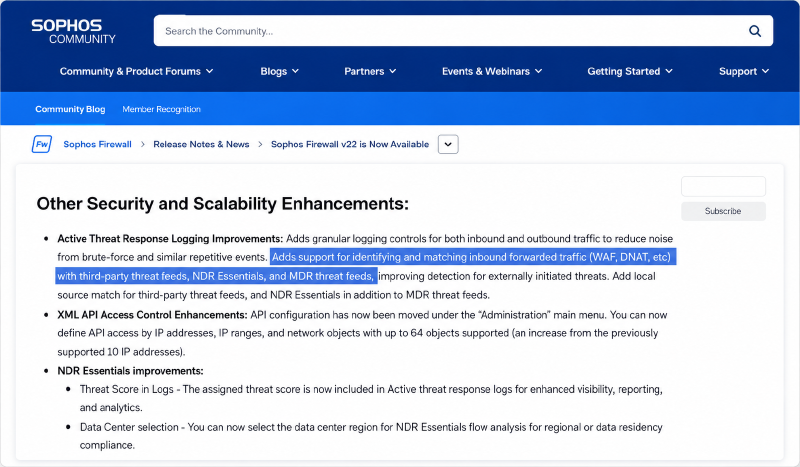
The practical conclusion was simple: third-party threat feeds are useful, but they are not a replacement for inbound firewall-rule design. For DNAT-published services on SFOS 21.5, a conventional drop rule using an IP host group is still the more reliable inbound control. The validation used a separately maintained IP block group populated through the Sophos REST API with known-bad CIDR ranges from sources like Emerging Threats. That gave partial coverage, but it required separate maintenance, missed Pramaan’s normalization, and did not get the same refresh behavior.
Why This Needed No Paid Threat-Intelligence Feed Subscription#
The expensive part of threat intelligence is not always the data.
There are excellent paid feeds, and they have their place. But for many teams, there is already meaningful value in public community intelligence if it is handled properly.
This setup did not need a paid threat-intel subscription because it used:
- community feeds,
- scheduled sync jobs,
- simple normalization,
- organization-level publishing,
- and firewall-native third-party feed polling.
The cost was engineering time and infrastructure, not license or feed subscription cost.
This does not mean the complete firewall deployment is license-free. Sophos third-party threat feeds require the relevant Sophos firewall licensing. The point is narrower: Pramaan did not require an additional commercial threat-intelligence data subscription.
That distinction matters for small teams.
Not every organization can buy another security product. But many can use what is already available, make it safer, and integrate it into existing controls.
The Authentication Limitation Nobody Talks About#
This was one of the quieter lessons from the implementation.
Threat-feed publishing is not only limited by what the platform can generate. It is also limited by what the firewall can consume.
Sophos XGS gives a few useful options for third-party feeds:
- no authentication,
- basic authentication,
- API key in a header,
- API key in query parameters,
- server certificate validation,
- polling interval control.
That is good enough for many simple feed providers. But it is still not the same as being a full HTTP integration client.
Many firewalls do not support richer provider authentication patterns such as OAuth client credentials, signed requests, mTLS client certificates, custom token refresh flows, HMAC signatures, or complex multi-step API calls. Even when a threat intelligence provider exposes a good API, the firewall may only understand:
“Give me a URL that returns one indicator per line.”
That limitation shaped the design.
Pramaan can be richer on the ingestion side. It can fetch upstream feeds with configured headers, URL templates, GET/POST methods, multiple content formats, compression handling, parsing, normalization, and secret placeholders. But on the publishing side, the feed still has to become something firewall-friendly: a plain text URL that Sophos can poll reliably.
So Pramaan acts as the translation layer.
Upstream, it can deal with messy providers.
Downstream, it speaks the simple language the firewall understands.
In the current MVP, the published Pramaan feed URLs are intentionally simple for firewall compatibility. A stronger production version should add enforced API-key validation on published feed endpoints, key rotation, per-organization feed keys, and clear access logs that store only key prefixes, never full secrets.
The Design Decisions That Mattered#
Global Sync Once#
If ten organizations use the same feed, the platform should not download it ten times.
Pramaan syncs source feeds centrally, stores normalized indicators, and then creates organization-specific views from that data.
This keeps the system cheaper, simpler, and easier to debug.
Organization-Specific Publishing#
Every organization can have its own feed URLs and its own feed selection.
This matters because threat appetite is not universal. One organization may want aggressive blocking. Another may want a shorter block window or stricter source selection. Another may need to exclude specific business-critical endpoints.
Allowlist Wins#
This rule is non-negotiable.
If an indicator exists in a source feed and an organization allowlists it, the published feed should not include it.
False positives are not just technical mistakes. They break trust. Once the firewall blocks something important because the platform ignored an allowlist, people stop trusting automation.
During the pilot, we did not hit a single false-positive outage, largely because the allowlist workflow was built before enforcement went live. But one clean pilot does not prove the workflow is perfect. The real test of a block feed is how quickly and safely you can undo a mistake.
Plain Text Output#
The published feed is intentionally simple.
One indicator per line.
No complex API contract. No custom agent. No firewall-side parsing logic.
The less the firewall has to understand, the more reliable the integration becomes.
Access Logs#
Every feed request should leave a trail:
- organization,
- indicator type,
- request path,
- status code,
- indicator count,
- client IP,
- user agent,
- forwarded-for metadata.
But it should not log secrets.
Authorization headers and full API keys do not belong in logs. A defensive service should not become a credential leak.
What I Would Improve Next#
This version proved the value, but there are two things that matter most right now. The SFOS 22 upgrade and DNAT validation that originally appeared here as future work have since been completed; Part Two covers the expanded validation and its results.
Better Expiry Handling#
The 30-day block and 30-day monitor windows are a deliberate first guess, not a final policy. The next version should make expiry more explicit: source-level defaults, indicator-type defaults, local-hit extensions, and clear reasons for why an indicator is still blocked or only monitored.
Automatic Re-Promotion on Repeat Hits#
Right now, an indicator can age from block to monitor, but the reverse trip is manual. The next step is automatic promotion: if an IP in monitor mode appears in local telemetry again, Pramaan should move it back to block mode and reset the 30-day window.
Other Ideas#
A few longer-term experiments are worth mentioning but are not urgent:
- Wazuh correlation. If Wazuh sees failed SSH activity and the source is already in a Pramaan block feed, that alert should carry more context.
- India-specific signals. A small honeypot in the network could capture India-relevant scanning patterns and feed them back into Pramaan as a local community-style feed. It might be useful, noisy, or both.
- False-positive workflow. Allowlist entries need owner, reason, expiry, and review history. Otherwise every exception becomes permanent.
What Stayed With Me#
This feature reminded me that security does not always need to be expensive to be useful.
Sometimes the better question is not:
Which product should we buy?
Sometimes it is:
What useful signal is already available, and how do we make it safe enough to act on?
Community feeds are not perfect. They can be noisy. They can go stale. They can contain mistakes. But with the right controls around them, they can still remove a surprising amount of useless traffic before it becomes operational noise.
The DNAT finding reinforced something else: enabling a feed and validating a feed are two different things. The reduction was real in the covered paths, but it only applied where ATP evaluation actually fired. Knowing where coverage ends is just as important as knowing where it works.
For me, the important lesson was this:
Feeds are easy.
Safe feeds are engineering.
Knowing your coverage boundaries is the rest of the job.
And when all of that works, the result is beautifully quiet.